

Managing Pre-Employment Checks and Compliance in SkyHR
Pre-employment checks can look deceptively simple.
Check someone’s right to work. Collect references. Verify qualifications where necessary. Upload the evidence somewhere safe.
Job done.
Except, for many organisations, it quickly becomes much more complicated.
Different roles can require different checks. Different industries have their own requirements. Customer contracts can impose additional conditions. Some evidence expires. And sometimes the important question isn’t whether you’ve uploaded a document at all, but whether every person currently satisfies everything required of them.
That’s why we’ve been rethinking pre-employment checks in SkyHR.
Rather than simply giving HR teams somewhere to store evidence, we want SkyHR to answer a much more useful question:
Does this employee currently have everything they are required to have?
And, at organisation level:
Who needs our attention?
Requirements aren’t the same for everyone
Some employment checks have very broad application.
Right to Work is the obvious example. UK employers have a responsibility to prevent illegal working and must carry out the appropriate Right to Work check before employing someone. Where someone’s right to work is time-limited, follow-up checks may also be necessary.
Read the Home Office Right to Work guidance
Beyond requirements such as Right to Work, however, there isn’t a single checklist that makes sense for every employee in every organisation.
What you need to establish can depend on the person’s role, employer, industry, regulatory environment and even the contracts their employer has agreed with its customers.
That’s why SkyHR’s approach is built around configurable requirements rather than a fixed list.
Why custom check types matter
Simply having categories such as Qualification, Identification or Training often isn’t enough.
An organisation employing office staff, drivers and technical specialists might need to distinguish between checks such as:
- Identification: Passport, Driving Licence
- Qualifications: Degree Certificate, NVQ Level 3, First Aid Qualification
- Professional Registration: role-specific registrations
- Training & Certification: Food Safety Training, Manual Handling, Site Safety Induction
Not every example above represents a universal statutory requirement. Sometimes a requirement exists because of regulation, sometimes because of the role, company policy or a customer contract.
SkyHR therefore supports custom sub-types so organisations can model the checks that actually matter to them rather than putting everything into a generic “Other” category.
Requirements can come from different places
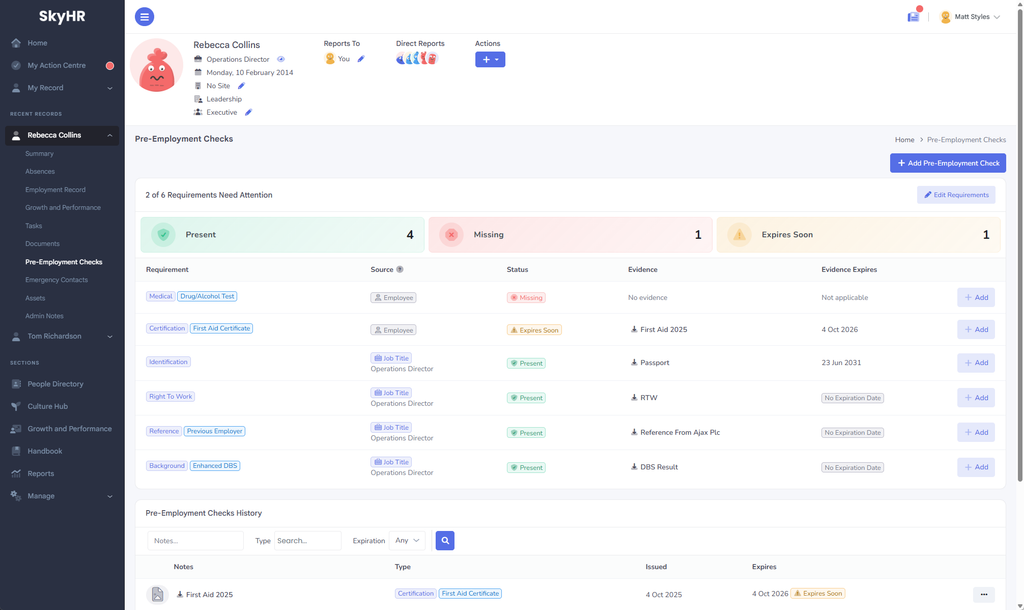
SkyHR can also show why an employee needs a particular check.
A requirement might apply across the organisation. An employer could, for example, require satisfactory references for every new starter.
Another might apply because of someone’s job title. A driver could require evidence that an office administrator doesn’t. Someone performing regulated activity may require different safeguarding checks from somebody in another role; the appropriate DBS check depends upon the role and activities performed.
Finally, an additional requirement might apply only to a particular employee.
That gives us three useful sources:
Organisation → Job Title → Individual
And SkyHR displays that source alongside the requirement, so an administrator can understand why a check is there rather than encountering an unexplained requirement years later.
Industry-specific compliance needs flexibility
This becomes particularly valuable in regulated or safety-conscious industries.
Food businesses, for example, must ensure staff have appropriate food hygiene and safety training. Current government guidance says staff handling food must receive appropriate training, including allergen training, before starting work, while a formal food hygiene certificate itself is not universally required. Keeping training records can help demonstrate this during an inspection.
Health and safety requirements also depend on the work people perform. HSE guidance emphasises providing adequate information, instruction, training and supervision, including for new recruits and people taking on new responsibilities.
Other organisations may need to establish professional qualifications, registrations, licences or certifications before allowing someone to perform particular work.
The important point is that compliance is contextual.
SkyHR doesn’t try to dictate one enormous universal checklist. It allows organisations to model the requirements that actually apply to their workforce.
Sometimes the customer sets the rules
There’s another source of requirements that generic HR systems can easily overlook: your clients.
Imagine a business supplying engineers or contractors to customer sites. Its normal role requirements might cover most of what it needs, but a major customer contract could specify additional training, certification, vetting or evidence for anyone working on its sites.
The employer then needs to answer questions such as:
Which employees are eligible to work on this contract?
or:
Can we demonstrate that everyone we’re sending to this customer currently has the required evidence?
Those requirements might not apply to everyone with the same job title.
SkyHR’s custom check types and employee-specific requirements allow organisations to record those additional requirements rather than forcing every situation into a generic document category.
Schools take this to another level
One of the clearest examples is education.
Schools and colleges in England operate under Keeping Children Safe in Education (KCSIE), the Department for Education’s statutory safeguarding guidance. The 2026 guidance came into force on 1 September 2026 and includes requirements around safer recruitment and pre-appointment vetting.
A central part of this is the Single Central Record (SCR).
The SCR provides a central record of relevant checks carried out on staff and other people within scope. Depending on the person and circumstances, this can involve areas such as identity, DBS and barred-list checks, professional qualifications, Right to Work, overseas checks, prohibition from teaching and Section 128 checks.
Not every check applies to every person.
That’s exactly the kind of compliance problem that becomes difficult to manage as a simple collection of uploaded documents.
A school doesn’t merely need to know:
“Have we uploaded some DBS certificates?”
It needs visibility of:
“Have the appropriate checks been carried out for the people to whom they apply?”
That’s a very different problem.
From storing evidence to understanding compliance
This distinction led to the latest redesign of Pre-Employment Checks in SkyHR.
Previously, the screen was primarily centred around checks and evidence that had already been recorded. Useful, but it still left HR to interpret the data.
We’ve turned that around.
SkyHR now starts with the requirements.
For each employee, you can immediately see what is required, why it is required, whether evidence is present, what’s missing, what’s expired and what’s approaching expiry.
Historical check records and evidence remain available underneath, but they’re no longer the main story.
The main story is the employee’s current position.
See what needs attention before it becomes a problem
Recording an expiry date isn’t especially useful if nobody notices when that date arrives.
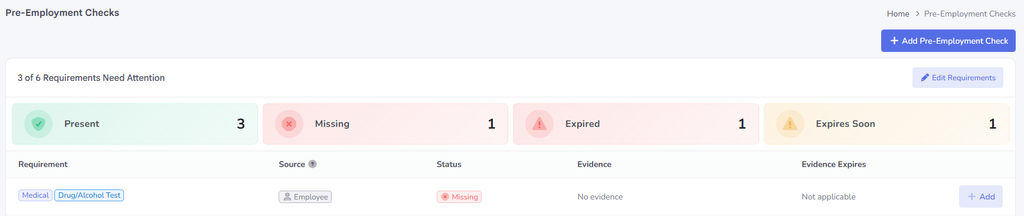
SkyHR surfaces requirements where evidence is approaching expiry or has already expired:
- Present: evidence is currently recorded
- Missing: a requirement exists but the necessary evidence hasn’t been recorded
- Expires Soon: evidence exists but requires attention
- Expired: the existing evidence has passed its recorded expiry date
The requirement and its evidence are also treated separately. Replacing expired evidence doesn’t remove the underlying requirement; new evidence can satisfy it while the previous record remains part of the history.
One employee is only half the problem
An HR administrator responsible for 50, 100 or 500 employees shouldn’t have to open every employee record to discover where the problems are.
That’s why we’ve also introduced a Pre-Employment Checks Matrix report.
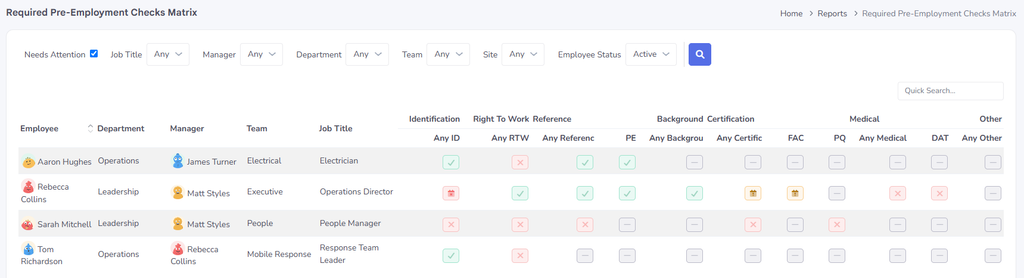
The report turns the same requirement data into an organisation-wide compliance view.
Rather than asking:
“Is Flora’s record complete?”
HR can ask:
“Where are the gaps across our organisation?”
Employees and requirements can be viewed together, making it much easier to identify missing, expired and soon-to-expire checks.
For a school, this can provide a particularly useful way to support the maintenance and review of information needed for its Single Central Record.
For another organisation, the same report might provide oversight of Right to Work evidence, references, licences, qualifications or its own custom compliance requirements.
The principle is the same:
Don’t make HR search for problems. Surface the people and requirements that need attention.
A clearer route from organisation to employee
The organisation-level and employee-level views are designed to work together.
The matrix provides the overview. When an issue is identified, the administrator can go to the employee record and see the requirement, its source, current evidence and status in context.
That creates a much more useful workflow:
Define what’s required → automatically apply requirements → record evidence → monitor status → identify exceptions → resolve them
rather than:
Upload documents → hope somebody remembers to check them later.
Compliance shouldn’t mean another spreadsheet
For many organisations, the complexity isn’t caused by having thousands of different rules. It’s caused by having a manageable set of rules multiplied across dozens or hundreds of people.
A spreadsheet can record those things.
What it doesn’t naturally do is understand them.
It doesn’t inherently know that a new employee with a particular job title should acquire a particular set of requirements. It doesn’t automatically distinguish an organisation-wide requirement from a role-specific one. And unless somebody builds and maintains the necessary processes, it doesn’t actively tell HR which employees need attention.
That’s the direction we’re taking SkyHR.
We want employee data to be more than something organisations store.
We want SkyHR to help organisations understand what that data means and where action is required.
The redesigned Pre-Employment Checks area and organisation-wide matrix are another step towards that goal.